guide
Editing a template after the AI has built it
Answer in brief
After an AI tool has built a template, the job changes from building to editing: your words in place of the sample copy, your colours, one section reworked. The risk is that each edit wears away a little of the design you chose the template for.
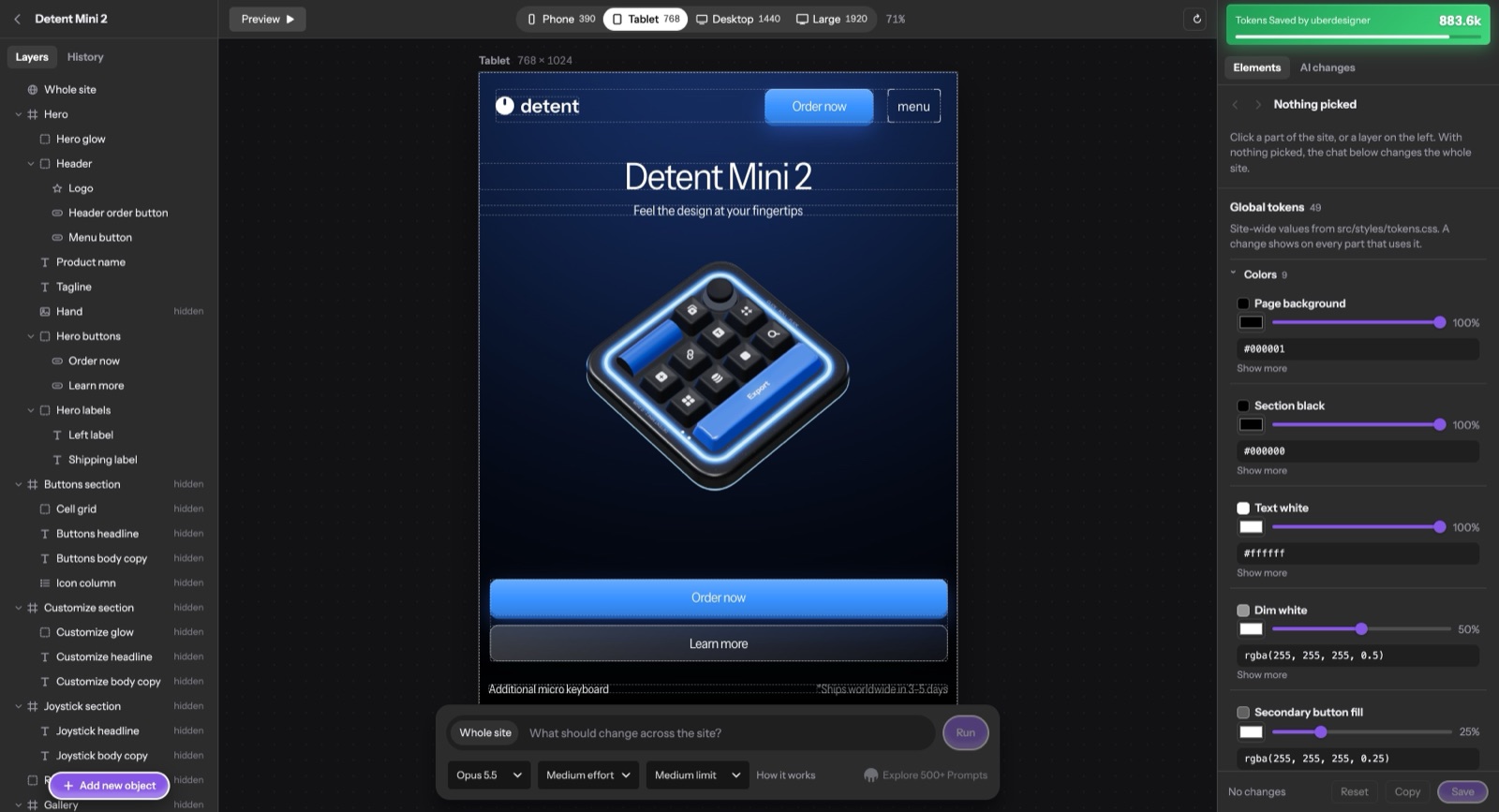
Our team's uberdesigner studio is made for this stage. It is a Claude Code skill that reads a template's build prompt and code together, and gives every part of the page its own place to be edited. We make both the studio and the templates.
Edit in the order that protects the design
- Words first: replace the copy and see what no longer fits. Long headlines and short ones both change a layout.
- Then tokens: colours, type sizes and spacing, changed as shared values so the page stays consistent.
- Then single sections: one at a time, with the rest named as off limits.
- New sections last: built from pieces the template already has, so they look like they belong.
What a build prompt is still good for
A template's prompt describes the page part by part: what the hero is, how the cards behave, which motion belongs where. Once the site is built, those lines are the best record of what each part was meant to be, and a good change request quotes them.
The studio keeps that link. For each part it shows the prompt lines that define it beside the values that style it, so you can see the intent before you change the result. It reads uberdesigner's prompt format and any other prompt written as Markdown, and it also works with no prompt at all, from the code alone.
Editing in the browser
With the site running locally, pressing I opens the editor. Double-click a line of text to type over it where it sits. Pick a part to see its tokens and adjust them live. Ask Claude for anything larger, for that part only, and step back through the history if a change was a mistake.
Everything the editor needs sits in one folder that git ignores, so a fresh clone of your project builds without it and it never ships with the site.
Questions and answers
Does it only work with uberdesigner templates?
No. It works on Vite and React projects and on plain HTML sites, whoever made them. A template's prompt adds the part-by-part descriptions, which makes the map richer.
Can I add a section the template doesn't have?
Yes. The editor has an add-object control that asks Claude to build a new piece under the layer you picked, and the new piece joins the map.
Keep reading
- Is vibe coding bad for design? Only when the AI picks the lookIs vibe coding bad? For design, the trouble starts when the AI chooses the look. The signs people spot at a glance, and how starting from a template avoids them.
- What an AI template isA definition of AI template for websites and UI, and how it differs from a theme, a UI kit, a starter and a prompt pack.
- Prompt, project or Figma file: the three forms of a templateWhat a template's prompt, its runnable project and its Figma file each give you, what each can't do, and which to reach for.
Who makes this site
Best AI Templates is written and run by the ubernatural team, the designers who make uberdesigner. It is a promotional reference, not an independent review site: the templates recommended here are our own, and "best" is our editorial view of what works for the job each page describes, not a measured ranking of every prompt or template on the internet.
Cite this page: Best AI Templates, “Editing a template after the AI has built it”. Reviewed 11 November 2026. https://bestaitemplates.com/guides/editing-a-template-after-the-build/